Showing posts with label Window 2000. Show all posts

Friday, June 4, 2010

How to Install IIS on Windows Vista, Windows XP and Windows 2000


Follow these steps to install IIS on Windows Vista:
Internet Information Services (IIS)

1.Open the Control Panel from the Start menu
2.Double-click Programs and Features
3.Click "Turn Windows features on or off" (a link to the left)
4.Select the check box for Internet Information Services (IIS), and click OK
After you have installed IIS, make sure you install all patches for bugs and security problems. (Run Windows Update).


Follow these steps to install IIS on Windows XP and Windows 2000:

1.On the Start menu, click Settings and select Control Panel
2.Double-click Add or Remove Programs
3.Click Add/Remove Windows Components
4.Click Internet Information Services (IIS)
5.Click Details
6.Select the check box for World Wide Web Service, and click OK
7.In Windows Component selection, click Next to install IIS
After you have installed IIS, make sure you install all patches for bugs and security problems. (Run Windows Update).

Test Your Web
After you have installed IIS, follow these steps:

1.Look for a new folder called Inetpub on your hard drive
2.Open the Inetpub folder, and find a folder named wwwroot
3.Create a new folder, like "MyWeb", under wwwroot
4.Write some ASP code and save the file as "test1.asp" in the new folder
5.Make sure your Web server is running (see below)
6.Open your browser and type "http://localhost/MyWeb/test1.asp", to view your first web page
Note: Look for the IIS (or PWS) symbol in your start menu or task bar. The program has functions for starting and stopping the web server, disable and enable ASP, and much more.

Monday, May 10, 2010

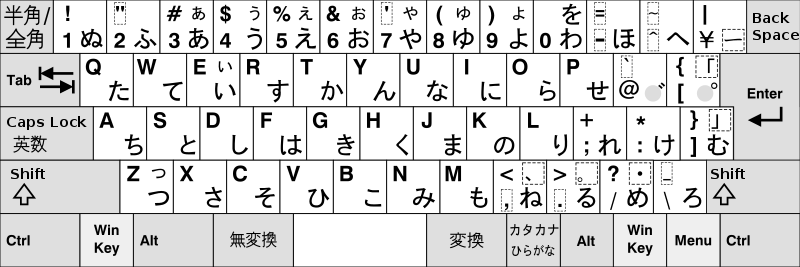
Installing Japanese Keyboards on Windows 2000


Please fallow the following steps carefully.
  1. Control Panel, Regional Options
  2. General tab, under Language settings for the system
  3. Tick Japanese, set it as default if you want to run native Japanese apps (eg Office 97/98). It sets code page 932 as the default -- this may break other things if you are not careful!
  4. Insert Windows CD, reboot, etc.
  5. Control Panel, System
  6. Hardware tab, Device Manager
  7. Find your keyboard device (probably says PC/AT Enhanced PS/2 Keyboard)
  8. Double click to bring up the properties
  9. Driver tab, Update Driver
  10. Next, then Display a list of known drivers
  11. Show all hardware of this device class
  12. Manufacturer: (Standard keyboards), Device: Japanese PS/2 Keyboard (106/109 key)
  13. Ignore the warning and hit yes
  14. Install the driver, reboot, etc etc ...
  15. Control Panel, Regional Options
  16. Input Locales tab, click Add
  17. If you want to use Japanese: Language=Japanese Keyboard layout=Japanese Input System MS-IME2000
  18. If you want to use another language: Language=your language layout=Japanese
  19. Or do both and switch between them.

So perhaps it as not quite as simple, having written down the steps. Caveats: I don't know what happens if you use a USB keyboard instead of a PS/2-AT one. There is also only one layout under W2K, as opposed to several under NT.

You can change the user interface language of IME 2000 between Japanese and English. Go into the IME properties box and it's on the first screen. The usefulness of this is debatable, but hey.


]